
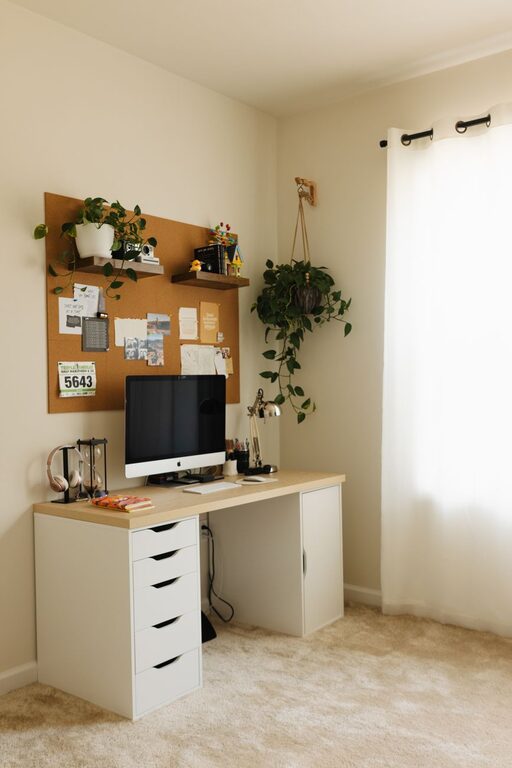
Creating a home office that feels both cozy and productive is essential for anyone who works remotely or spends a significant amount of time working from home. A well-designed workspace can improve focus, reduce stress, and increase efficiency, all while making you feel comfortable throughout the day. Here are some practical tips to help you set up a home office that strikes the perfect balance between comfort and functionality.
Choose the Right Location
Assess Natural Light
Natural light has a positive impact on mood and productivity. Try to set up your workspace near a window to take advantage of daylight. Position your desk so that the light doesn’t cause glare on your screen but illuminates your work area effectively.
Consider Privacy and Noise Levels
Choose a space with minimal distractions and noise. If you don’t have a spare room, consider using a corner of a less frequented room. Noise-canceling headphones or a white noise machine can help improve focus if you can’t avoid some background noise.
Invest in Ergonomic Furniture
Comfortable Chair
A supportive office chair is crucial for long hours of work. Look for one with adjustable height, lumbar support, and armrests. Sitting comfortably helps prevent back and neck pain.
Functional Desk
Your desk should be spacious enough for your computer, notebooks, and other essentials. Standing desks or adjustable sit-stand desks are popular options that encourage movement and reduce strain.
Organize and Declutter
Use Storage Solutions
Keep your workspace tidy with shelves, filing cabinets, and desk organizers. When everything has a place, you can find what you need quickly without distractions.
Minimize Clutter
Limit the items on your desk to the essentials. Too many objects can create visual clutter, making it harder to concentrate.
Personalize Your Space
Add Cozy Elements
Soft rugs, cushions, or a comfortable throw can create a welcoming atmosphere. These small touches make the space feel more inviting and encourage you to spend time there.
Incorporate Plants
Indoor plants not only improve air quality but also add a touch of nature that can boost mood and creativity. Choose low-maintenance varieties like succulents or spider plants.
Manage Lighting Effectively
Combine Ambient and Task Lighting
Relying solely on overhead lighting can cause eye strain. Use a combination of ambient lighting for general illumination and task lighting, such as desk lamps, for focused work.
Adjust Brightness
Choose bulbs with adjustable brightness or color temperature to match the time of day and reduce eye fatigue.
Establish a Routine
Dedicated Work Hours
Set specific working hours to create boundaries between work and personal time. This helps maintain a healthy work-life balance.
Regular Breaks
Include short breaks in your schedule to rest your eyes and stretch your body. Use techniques like the Pomodoro method to keep energy levels consistent.
Use Technology Wisely
Reliable Equipment
Ensure your computer, internet connection, and peripherals like printers and headphones are reliable and up to date.
Minimize Distractions
Disable unnecessary notifications and use apps that block distracting websites during work hours to maintain focus.
Maintain Good Air Quality
Ventilation
Keep your workspace well-ventilated by opening windows regularly or using a fan to circulate fresh air.
Air Purifiers
Consider an air purifier if you live in a polluted area or have allergies, as clean air can improve concentration and health.
Final Thoughts
Designing a cozy and productive home office is about creating a space that invites you to work efficiently while feeling comfortable and relaxed. By choosing the right location, investing in ergonomic furniture, organizing thoughtfully, and personalizing your space, you can boost both productivity and well-being. Remember, your workspace should work for you — so don’t hesitate to make adjustments as you discover what helps you perform your best.